

Setup
Before your iOS app can accept payments, you need to install the SDK and initialize it with your Whop configuration. No backend is required.
Installation
The WhopCheckout SDK is distributed via Swift Package Manager.
Create an API Key
Before configuring the SDK, create an API key with the iap:read permission:
Critical: Only grant the iap:read permission to this API key. This
permission is specifically designed for client-side use and limits the key to
IAP operations only. Never use an API key with broader permissions in your iOS
app.
SDK Configuration
Initialize the SDK once at app startup, typically in your App struct:
Configuration Parameters
Method Reference: configure()
Throws: WhopCheckoutError if configuration fails.
Note: Call this once at app startup. Access the shared instance via Checkout.shared and pass it through the SwiftUI environment.
Plan Mappings
The planMappings parameter maps your Whop plans to Apple StoreKit products. Pass an empty array [] if you don’t need StoreKit fallback.
In the US, the SDK uses Whop’s web checkout (2.7% + $0.30 fees). Outside the US, it can fall back to StoreKit (Apple’s 15-30% fees) if you provide plan mappings. The plan mapping tells the SDK which Apple product corresponds to each Whop plan.
How it works:
- You create plans in Whop (e.g., “Monthly” for $9.99/month)
- You create matching products in App Store Connect with the same pricing and billing period
- You map them together in
Checkout.shared.configure()
Important: Your Whop plans and Apple products must have matching pricing and billing periods. If your Whop plan is 9.99/month.
Setting up products in App Store Connect
- Go to App Store Connect and select your app
- Navigate to Monetization → Subscriptions (or In-App Purchases for one-time)
- Create a subscription group if you haven’t already
- Add products that match your Whop plans:
- Use a descriptive Product ID (e.g.,
com.yourapp.monthly) - Set the same price as your Whop plan
- Set the same billing period (monthly, yearly, etc.)
- Use a descriptive Product ID (e.g.,
- Submit the products for review (they must be approved before testing)
You can test with sandbox accounts before products are approved. See Apple’s testing guide.
Finding Your IDs
Where to find your Company ID
Your company ID is in the URL when viewing your Whop Dashboard:
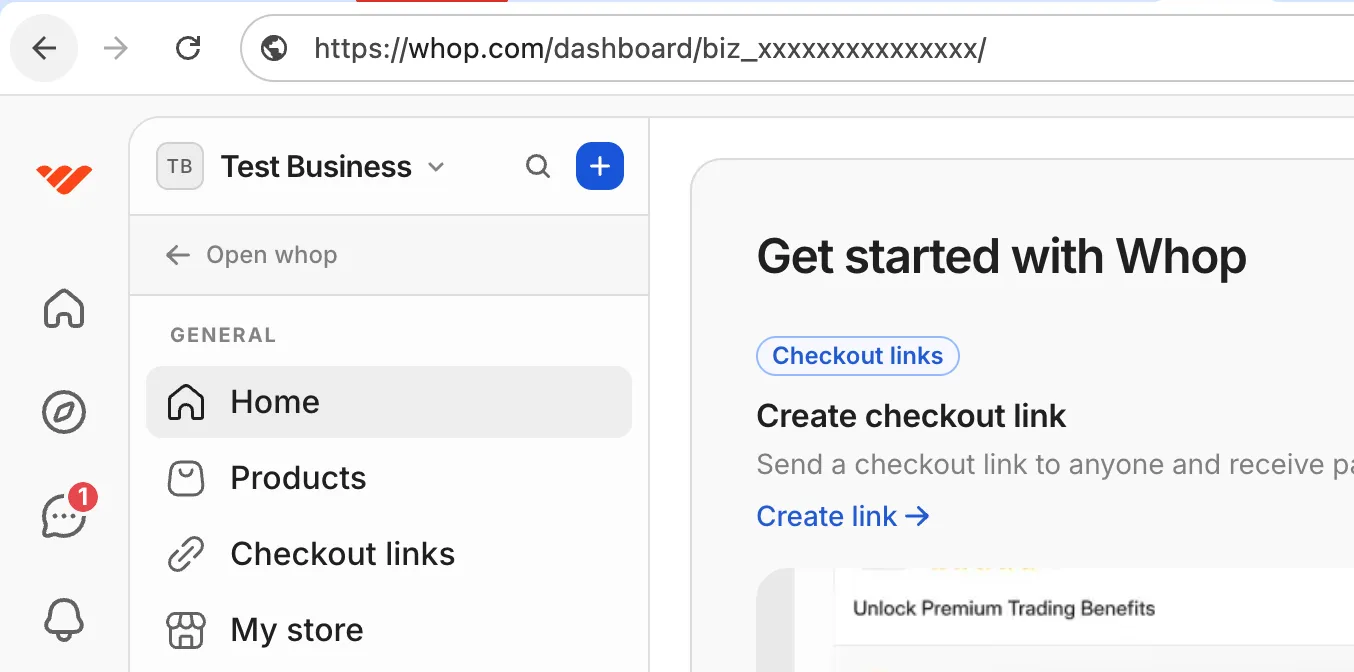
Where to find your Plan IDs
Plan IDs are found in your Whop Dashboard:
- Go to Whop Dashboard
- Click Products in the sidebar
- Select the product containing your plans
- Click on a Plan (e.g., “Monthly”, “Yearly”)
- The Plan ID is shown in the URL and the plan details:
Plan IDs start with plan_. You’ll use these in the SDK’s configure() method to map Whop plans to Apple StoreKit products.
Using the Environment
The SDK is an @Observable class, so you can pass it through SwiftUI’s environment:
Refreshing Plans
After initialization, you can refresh plans on-demand to get updated pricing or availability:
This is useful for:
- Updating prices after network recovery
- Reflecting server-side plan changes
- Implementing pull-to-refresh in subscription screens
FAQ
Can I configure the SDK later (not at startup)?
Yes, but the SDK won’t function until configure() completes. Check isInitialized before using other SDK methods.
Is it safe to include the API key in my app?
Yes, as long as the API key only has the iap:read permission. This
permission is specifically designed for client-side use and limits what the
key can access. Never use an API key with broader permissions in your iOS app.
Do I need a backend?
No. The SDK handles authentication directly using your API key. No backend token endpoint is required.
Are webhooks sent when using the SDK?
Yes. All standard Whop webhooks are sent for purchases made through the SDK:
membership.went_valid- When a subscription becomes activemembership.went_invalid- When a subscription expires or is cancelledpayment.succeeded- When a payment completespayment.failed- When a payment fails
This means you can use the same webhook handlers for SDK purchases as you do for web purchases. See the Webhooks documentation for details.
The SDK handles subscription status entirely client-side via checkout.isSubscribed. Webhooks are only needed if you have server-side logic that needs to know about purchases.